
VPN Prevention on an Enterprise Network
Virtual Private Networks have become ubiquitous in the last year or so as governments start implementing restrictions on social media and other online content. If rumours are to be believed, they will soon come for VPNs themselves!
I’m not convinced every user understands that using a VPN in and of itself is not the silver bullet for privacy that they think it is; they are merely trading one organisation looking at their data for another.
We've already seen incidents of a VPN that claimed not to record user logs being caught recording user logs.
All I’m going to say is if you are wanting to use a VPN, use one with a good reputation, not some free app from the Play Store.
But anyway, there will always be use cases for VPNs - if you’re using a public network a VPN is essential to protect your data. However, as administrators, we probably don’t want users tunnelling out of our network for a variety of reasons.
- We want to implement web filtering and block access to certain websites.
- We want to inspect traffic with IDS/IPS.
- We want to prevent users exfiltrating data using DLP.
To do that, we need to be able to detect and block users trying to use VPNs, so first, we better understand how VPNs work.
Table of Contents
How VPNs Work
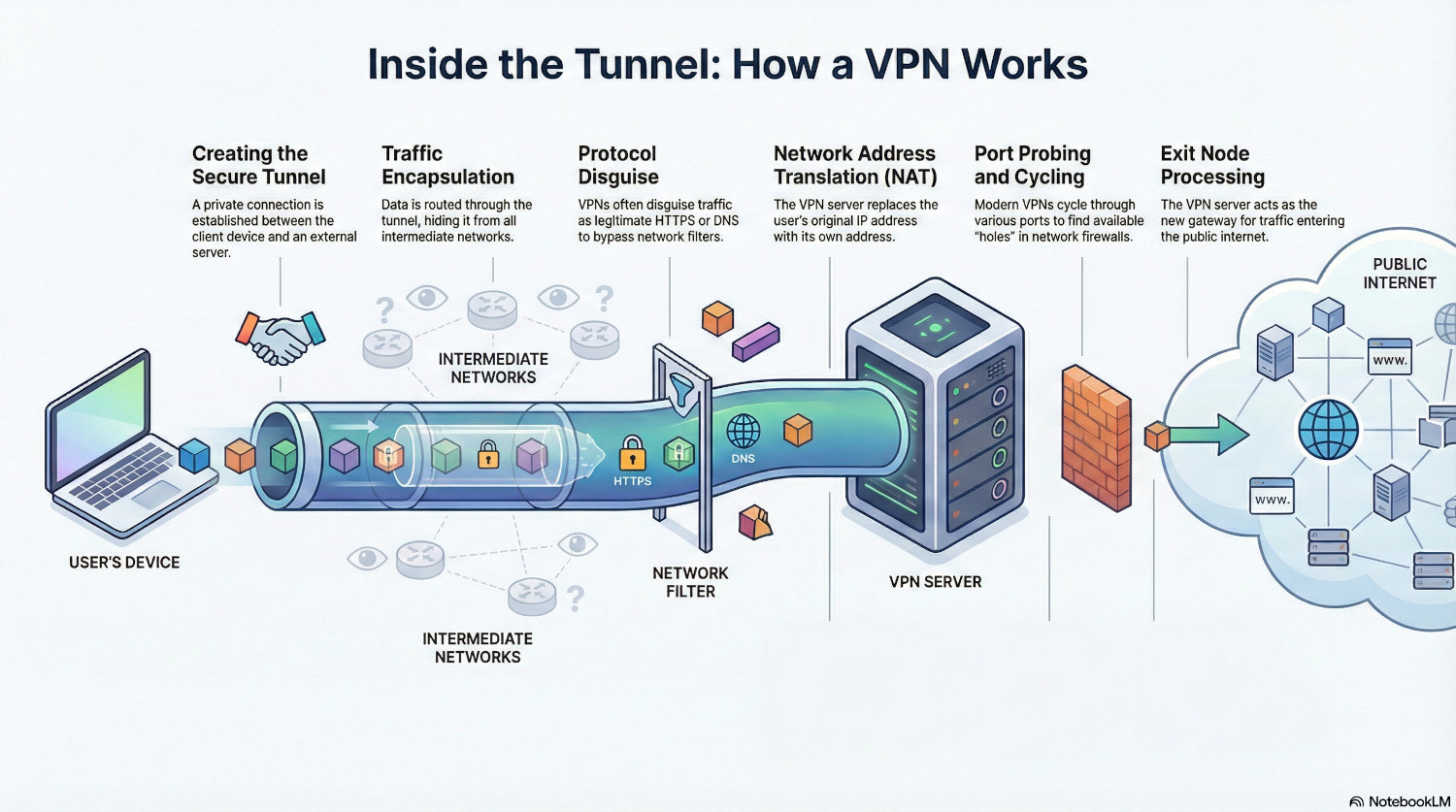
VPNs work by creating a secure tunnel between the client device and a server outside of the network the device resides on. Traffic can then be routed through this tunnel, hiding it from the networks it passes through.
When the traffic exits the tunnel, the VPN server performs Network Address Translation (NAT) to replace the original source IP address with the address of the server.
This is similar to normal traffic, but instead of the local gateway doing the NAT, the VPN server is doing it from somewhere else.
Different VPN protocols use different methods to make this tunnel. Some require specific network ports and don’t try to hide the fact it is a VPN, and some actively try to disguise the traffic as something else, usually something legitimate like HTTPS or DNS.
Modern VPNs will cycle through a whole range of ports and protocols when they try to connect, probing the network for a hole they can blast out of. Just like attackers trying to get in, to prevent VPNs getting out administrators need to block all potential escape vectors.
How to Block VPNs
Blocking VPNs is an arms race. VPN providers want their product to work so they invest heavily in developing firewall busting techniques. To effectively block them, administrators need to take a multi-layered approach, from the device right to the network edge.
Administrators must use every tool in their arsenal to combat unwanted network traffic, both inbound and outbound. Many of the tactics deployed here should be standard cyber security practices. The bottom line is all traffic on your network should be intentionally allowed. If something isn’t specifically allowed, it should be denied.
Device Protection
Control of devices is a massive benefit in preventing unauthorised VPN usage. By preventing app installation the users are prevented from installing most VPNs.
Some browsers have VPNs built into them. Control over browsers should be maintained, and control over browser extensions is also a must, for this and other security reasons.
QUIC is a modern protocol for securing and speeding up web traffic, but firewalls cannot effectively perform DPI on QUIC packets. Despite the speed benefits, it should be blocked on the firewall, but it can also be blocked on the device, forcing browsers to fall back to standard TLS.
This is all pretty straightforward on managed devices, but preventing VPNs on BYOD is a massive challenge. A lot will depend on how far you can reach into those devices. Users will be reluctant to install a certificate to perform web filtering and deep packet inspection, so there will be limits on how effective the blocking will be.
Recommendation: Only allow approved browsers and browser extensions on managed devices
Recommendation: Only allow approved app installation on managed devices
Recommendation: Disable QUIC and block it at the firewall
Wireless Filtering
Enterprise wireless systems are able to do layer 7 application control on the AP itself. By looking at packet headers, DNS requests and handshake analysis the AP is often able to determine the application being used, even on unmanaged devices.
Application recognition can be inconsistent because it relies heavily on cleartext 'hints' like SNI (Server Name Indication) and Certificate Analysis during the initial handshake. This becomes problematic with CDNs since multiple services often share the same IP infrastructure, and the controller may record to the first application it identifies on that IP, miscategorising subsequent traffic as the same service even when the destination has changed.
But still, by implementing a layer 7 rule to block identified VPN and tunnelling protocols, some VPNs can be blocked before they even get onto the network. This has the added benefit of lowering the resources needed further down the line to block traffic, as the load is distributed across all the wireless access points.
Recommendation: Use Application Filtering Rules on Wireless Access Points
DNS Filtering
Forcing clients to use plain text DNS allows the ability to stop unwanted domains being resolved, but firstly, we need to stop clients using DNS-over-TLS (port 853) and DNS-over-HTTPS. These can be blocked at the firewall level, but we can also block canary domains used by some apps to see if encrypted DNS is possible.
- use-application-dns.net
- mask.icloud.com
- mask-h2.icloud.com
- _dns.resolver.arpa
- doh.test
If these domains return NXDOMAIN, the applications will fall back to plain text DNS, and now the requests are readable, we can apply a blocklist of any known VPN domains.
Recommendation: Block DNS-over-HTTPS and DNS-over-TLS
Recommendation: Use DNS filtering to block known VPN domain names
IP Blocking
There are services out there that will provide a list of known VPN and proxy IP addresses, usually for a fee. Once this list has been obtained, a firewall rule can be created to drop all traffic to those addresses.
VPN providers frequently cycle their IP ranges though, so this is not a one-time fix and will need constant adjustment. Providers often charge a subscription, either monthly or annual to keep up-to-date.
Recommendation: Subscribe to a blocklist and block known VPN IP addresses
Port Blocking
A well designed firewall policy will block a lot of VPN traffic by default. There is no reason for most TCP and UDP ports to be unblocked, and certainly not allowed out to any internet address.
The only ports that should be unrestricted to the internet are 80 (HTTP) and 443 (HTTPS). If any other ports are needed, they should be allowed only to necessary IP ranges. By only allowing those ports VPNs are unable to get out any other way, so we’re forcing the traffic to use TCP and port 443.
Recommendation: Block all outbound ports except 80 and 443. Only allow traffic on other ports to specific destinations.
MSS Clamping and Session Timeouts
We can also exploit the overhead VPNs place on packet sizes, using a technique called MSS Clamping. The encryption VPNs use add a certain amount of data, increasing the overall packet size. By restricting the Maximum Segment Size (MSS) VPNs are force to use more packets to send the same amount of data, which can make them unstable and slow the connection to an unusable speed.
MSS Clamping should be used cautiously. Most legitimate HTTPS traffc will adjust to the packet size changes gracefully, but business applications should be excluded further up the firewall policy to ensure they are unaffected.
Recommendation: Decrease MSS for generic HTTPS traffic
Recommendation: Decrease Session Timeouts for generic HTTPS traffic
Deep Packet Inspection (DPI)
Now we’ve reached the limit of what we can do without decrypting the packet. Deep Packet Inspection splits the encrypted tunnel between a client and a server into two, allowing the firewall to read the full contents of the packet.
This is essentially a man-in-the-middle attack, and for DPI to work properly the firewall root certificate needs to be installed on the end user device, so this is only really feasible on managed devices.
Once packets are being decrypted, we can check they are what they claim to be. Traffic on port 443 should be HTTPS, and that has certain characteristics. Firewalls can be configured to check identifying features such as the handshake and protocol version, and discard any that don’t match HTTPS.
During the handshake a server should give it’s name in the Server Name Identification field. Firewalls can check this is actually correct and matches the hostname in the HTTPS request. Many VPNs spoof the SNI to domains that they know will pass filtering checks.
Recommendation: Enforce Strict Protocol Matching
Recommendation: Enforce Strict SNI Checking
Policy Enforcement
We need to work on the assumption that there will be some VPNs that are able to get through all of the above restrictions. The providers want to sell their product, and being able to market their VPN as a firewall buster is a good strategy. As such, they will always be looking for different methods to break out of a network.
The final mitigation is not technical. Users should be signing an Acceptable Usage Policy to use the organisation network, and this policy should be treated like any other policy.
If the senior management team don’t understand the policy and don’t want to enforce it, it has no meaning and is pointless. If users know that violating the policy will have consequences, it provides a deterrent.
Recommendation: Enforce an Acceptable Usage Policy (AUP) and ensure management are prepared to act on violations
Conclusion
It is always going to be an ongoing battle, but by following a logical, multi-layered approach we can force VPNs to use known vectors and then pick them off.
For a VPN to be successful, it has to pass through multiple controls.
- If it makes it onto the device, it has to get through the layer 7 filtering on the wireless.
- If it gets past that, it has to pass the IP and port block lists.
- If it makes it this far, it then has to trick the firewall DPI into believing it is genuine HTTPS traffic.
- If it achieves all of that, then the firewall can still interfere with the traffic, slowing it down and making the connection unstable.
All of these controls rely on IT leaders making clear, informed decisions about every level of IT, and on a ‘secure by default’ approach to network design.
Security is not just about what gets in, it’s also about what gets out.