Transport Protocols: TCP vs UDP
Almost all network traffic uses one of two transport protocols - TCP or UDP. These protocols are the base that most modern applications are built upon.
Each protocol achieves the same thing - it gets data from A to B - but they do so with different priorities. TCP cares about the destination, and it wants to know that the data was received correctly. UDP doesn’t care, it just wants to send it as fast as possible.
This post will look closely at each protocol, examining how they work and what other parameters are involved.
Table of Contents
TCP - Transmission Control Protocol
TCP is responsible for most of the traffic on a network, and on the internet, for three main reasons.
- It is connection oriented, meaning the receiver has to be listening and ready to communicate.
- It is reliable; the receiver has to acknowledge receipt of data.
- It is flexible, meaning it can adapt to different network conditions and handle errors.
These features mean that for applications who need all their packets to not only be delivered, but delivered in the correct order, TCP is the best protocol to handle their network communications.
Three-way Handshake
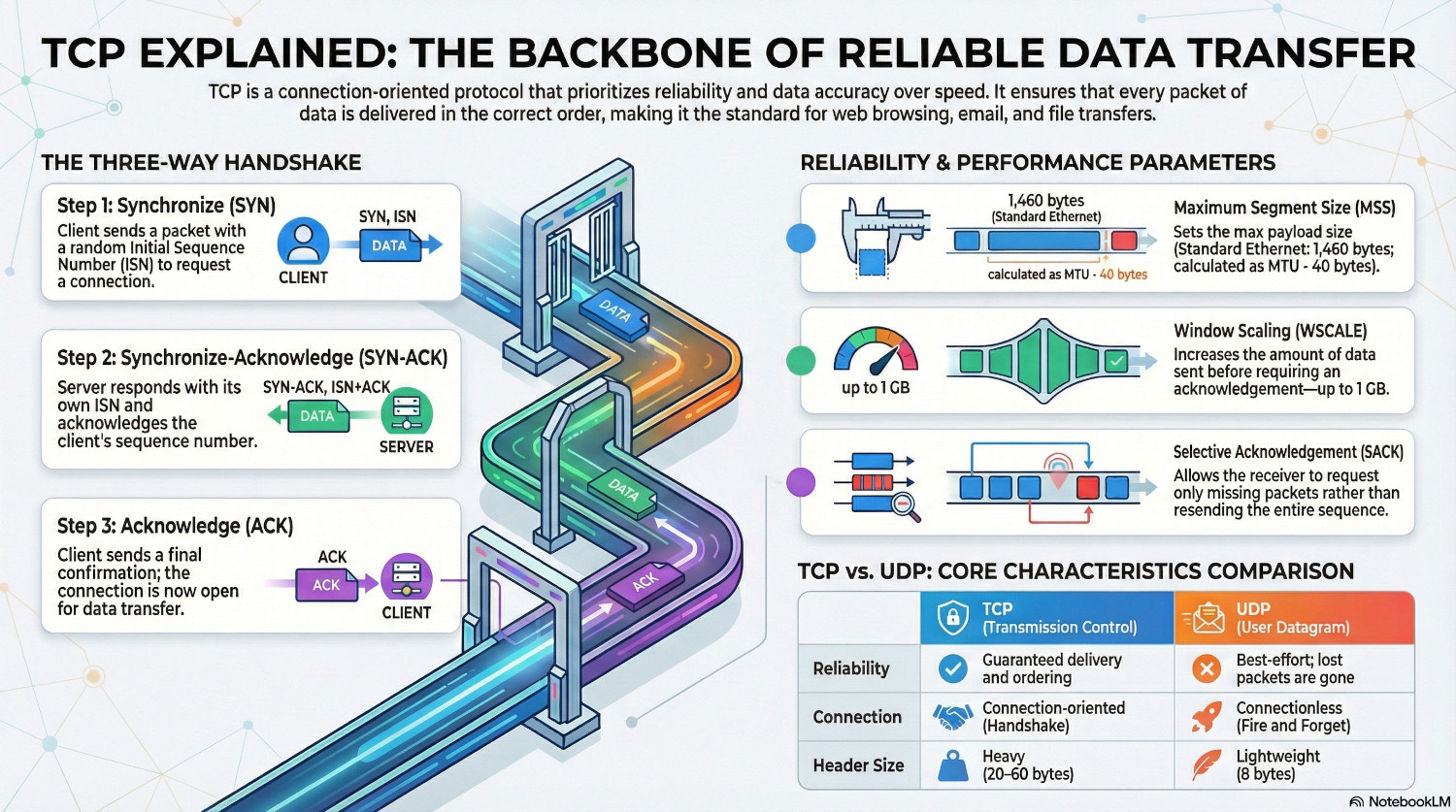
A TCP connection starts with a three-way handshake. During this process, a connection is opened between two network devices that ensures both are ready to begin sending and receiving data and are able to verify that every packet arrives in the correct order.
Synchronize (SYN)
The client want to talk to a server, so it picks a random Initial Sequence Number (ISN), and sends a packet with the SYN flag set. This tells the server that the client wants to establish a connection and start counting at the ISN value.
Synchronize-Acknowledge (SYN-ACK)
The server generates it’s own ISN, and sends a packet back with the SYN-ACK flag set. It acknowledges the client ISN by sending back the ISN + 1, and gives it’s own ISN.
Now both sides have a number they can use to verify that the other sides packets are received in the correct order. Each time either the client or server sends a packet, it increments it’s ISN.
Finish (FIN)
Acknowledge (ACK)
The client sends a final packet with the acknowledge flag set, acknowledging the servers ISN by sending ISN + 1. The connection is now open, and data can be transferred.
Parameters
During the handshake, various parameters are negotiated in the TCP Options field of the SYN and SYN-ACK packets.
Maximum Segment Size (MSS)
This sets the maximum size of a packet. Each size specifies the maximum size they can handle, and then picks the lowest value.
Typically, this is 1,460 bytes for standard Ethernet. This is derived from the Maximum Transmission Unit (MTU) of the network layer, which is 1,500.
$MSS = MTU - 20 bytes (IP Header) - 20 bytes (TCP Header)$
The MSS only specifies the payload size.
Window Scaling (WSCALE)
The TCP window determines how much data can be sent without waiting for an acknowledgement. Originally, it was only 64 KB which is tiny for modern communications. The WSCALE multiplier allows up to 1 GB to be sent before a acknowledgement is required.
Selective Acknowledgement (SACK)
Without SACK, if the sender sends 10 packets and the third one is lost, the receiver cannot acknowledge anything higher than the third packet, even if it has received it. This would cause the sender to resend everything from the third packet onwards, potentially duplicating packets it has already sent and consuming unnecessary bandwidth.
SACK (RFC 2018) allows the receiver to selectively acknowledge packets - to tell the sender that it didn’t receive #3, but it did receive 4, 5 and 6. Only the missing packet is sent.
RFC 2018 is an extension to the original TCP protocol, so it needs to be explicitly turned on in the handshake, in case a device is not capable of using it, but it can also be administratively disabled.
TCP Fast Open (TFO)
This is another modern extension, and allows data to be sent before the handshake is complete, but only if the two devices have communicated before. It requires a TFO Cookie, which is given by the server to the client the first time they connect..
Timestamps
Each packet in TCP is timestamped, which allows devices to calculate Round Trip Time (RTT). If the RTT is increasing, this could indicate a saturated network link, and TCP will proactively slow the rate to prevent a crash.
UDP - User Datagram Protocol
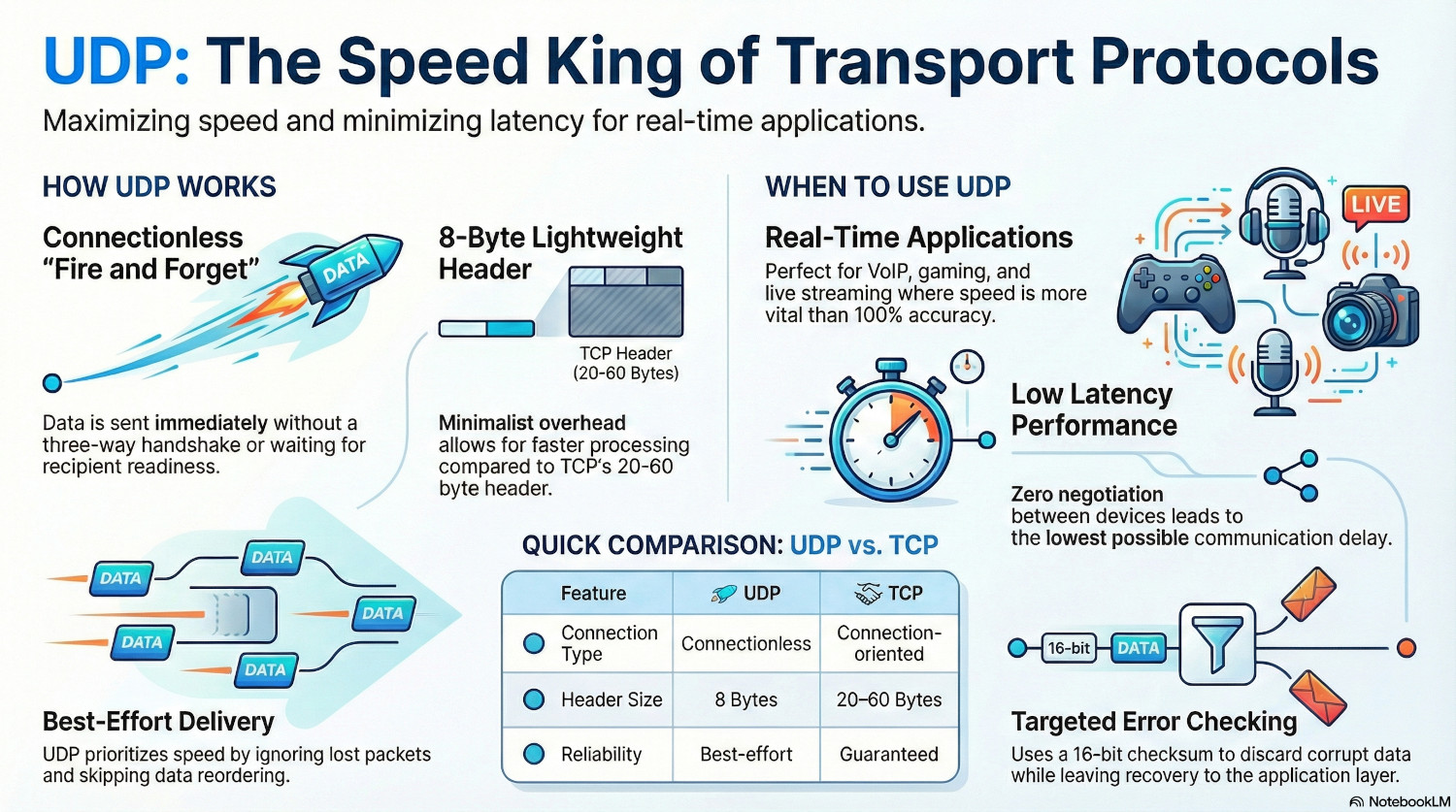
UDP serves a different purpose than TCP. Instead of reliability, it is built for speed. It doesn’t care if the data gets to it’s destination in the correct order, it just wants to send as much as possible, as fast as possible.
There is no handshake with UDP, the sender simply starts sending datagrams to the recipient. It doesn’t stop to wait for an acknowledgement, it just sends the next datagram, and the next one, and the next one.
The UDP header is only 8 bytes, and contains basic information such as source port and destination port.
Although it seems unreliable, modern networks actually lose very few packets, so it is perfectly possible to send data in this way. For data that is reliant on speed, such as real-time gaming or VoIP, UDP is the perfect choice. Error checking can be done at the application layer, but targeted at essential data only.
If a packet is lost, the connection isn’t put on hold while it is recovered. Because it is forgotten as soon as it is sent, nothing happens, and the next packet is processed instead. A single packet loss is unlikely to be noticed in the grand scheme of things, it is more important to keep the connection moving.
Error Checking
UDP may not care whether a packet was delivered, but the receiver does care if it gets corrupted on route.
Each UDP datagram contains a 16 bit checksum, calculated by the sender using details such as IP addresses. The receiver does the same calculation when it receives the datagram, and if it doesn't get the same result it assumes the data is corrupt and discards the datagram.
Comparison
| Feature | TCP (Transmission Control Protocol) | UDP (User Datagram Protocol) |
|---|---|---|
| Connection Type | Connection-oriented. Requires a formal "three-way handshake" before data is sent. | Connectionless. No handshake; data is sent immediately ("Fire and Forget"). |
| Reliability | Guaranteed. Lost packets are detected and retransmitted. | Best-effort. If a packet is lost, it is gone forever. |
| Ordering | Strict. Packets are reassembled in the exact order they were sent. | None. Packets can arrive in any order or not at all. |
| Header Size | 20–60 bytes. Heavy overhead due to tracking and options. | 8 bytes. Minimalist and lightweight. |
| Speed/Latency | Slower. Handshakes and acknowledgments create "chatter" and delay. | Faster. Zero negotiation leads to the lowest possible latency. |
| Flow Control | Yes. It slows down if the network is congested to prevent crashes. | No. It sends data at the speed the application dictates, regardless of traffic. |
| Usage | Used when accuracy is vital (Web, Email, File Transfer). | Used when speed is vital (Gaming, VoIP, Live Streaming). |
Conclusion
There is not a single right answer here; TCP is not universally better than UDP, and UDP is not universally better than TCP.
Each needs to be assessed for the use case. For example, if the application is transporting real-time voice data, UDP is the better choice. It is fast, and on a reliable network packets don’t need acknowledgement, and a single dropped packet won’t be missed.
Or, for transferring a file, TCP is the better choice. It ensures that all of the file arrives in the correct order, preventing the dreaded corrupted file at the destination.
Understanding how each protocol works helps administrators troubleshoot network issues. Are there frequent TCP re-transmissions in a packet capture? This indicates a lack of acknowledgement, meaning packets are not arriving correctly.
Ultimately, the choice between TCP and UDP is a balance between reliability and raw speed.