
Routing Protocols

Routing is the key to moving data between networks in the most efficient way. For it to be successful, routers need to know how to get to multiple destinations, so they can send a packet down the correct path.
If you think of a data packet as a letter, routing is the sorting and forwarding system used by the "post office" (the router) to ensure the letter reaches the correct house in the correct city.
Routing introduces a lot of key concepts as we move away from layer 2 and into layer 3. This post explains some of the key terminology, and looks at some of the main protocols used for routing.
Table of Contents
Core Concepts
The Control Plane
For a router to be able to direct traffic, it needs a routing table. This is essentially a map of the networks the router is connected to, and contains rules that dictate where a packet should go.
There are two different types of routing table - static or dynamic. A static routing table is populated by an administrator manually and has no knowledge of whether a path is actually active. A dynamic routing table is populated by a protocol such as OSPF and updates automatically when paths go up and down.
The Data Plane
When a packet arrives, the router strips off the layer 2 headers and inspects the destination IP address and compares it to the routing table.
If an address matches multiple routes, the router uses the longest prefix to determine which to use. For example, a packet for 10.10.10.10 would match 10.10.10.0/24 and 10.10.0.0/16. The longest prefix is /24, so the packet would be sent down the route for 10.10.10.0/24.
If it find a matching subnet, it encapsulates the packet in new layer 2 header with the exit interface MAC address and the MAC of the next hop, and directs it to the correct route.
If the router cannot find a matching subnet in the routing table, the router will drop the packet and return a ICMP Destination Unreachable message. Most routers have a default route of 0.0.0.0/0 that forwards any unmatched packets to the next hop.
Administrative Distance
If a packet matches two routes, and they have the same prefix length, the router will use Administrative Distance scores to break the tie.
Administrative Distance is the Cisco term for Route Preference or Protocol Priority. AD is the trustworthiness rating that is applied when a destination is available through two or more routes.
Cisco assigns routes learnt through different protocols different AD scores. If the prefix matching is the same, it will then use the AD score to decide which route to use. The route with the lowest AD wins.
These are the default scores for the different protocols:
| OSPF | 110 |
|---|---|
| RIP | 120 |
| eBGP | 20 |
| EIGRP (Summary) | 5 |
| EIGRP (Internal) | 90 |
| Static | 1 |
| Connected | 0 |
| EIGRP (External) | 170 |
Connected is a network that is directly attached to the router. It has the lowest score (most trusted) because it is right there. The router cannot be more sure of the route. Next up is a static route, as it has been programmed by the administrator.
The rest of scores are an indication of how much Cisco trusts the protocol.
Metrics
If prefix length and administrative distance still don’t break the tie (which will only happen if routes come from the same protocol as they will have the same AD), the router will use some of the following metrics to determine with route to take.
Hop Count is the measure of how many routers a packet must pass though to reach it’s destination. When a protocol use hop count to pick a route, it would choose the path with the fewest hops.
Bandwidth is the speed of the slowest link in the path. Routers will prefer higher speed paths where possible.
Cost is an inverse reflection of bandwidth. The faster the link, the lower the cost. The lets a router choose high speed links over slow ones.
Delay is the measure of time it takes a packet to traverse a path. Delay is used to understand how fast or slow a path is regardless of it’s overall capacity.
Reliability is a measurement of how often a link has failed, ranging from 1 to 255 where 255 is 100% reliable.
Load is a realtime measurement of how saturated a link is, ranging from 1 to 255 where 255 is completely saturated.
Routing Loops
A routing loop is formed when routers have the wrong information about paths. Very simply, if router A has a route that says the destination is through router B, and router B has a route that says the destination is through router A, then a packet is destined to loop between the two routers.
This can happen when a route goes down and but not all the routers learn a new route quickly enough. Each protocol mitigates this in different ways, but the main kill switch is the Time-To-Live (TTL) field in a packet.
Protocol Types
There are different types of routing protocol with different uses. Each protocol will be either interior or exterior, and distance vector or link state.
| Category | Description |
|---|---|
| Interior Gateway Protocol (IGP) | Interior protocols route traffic within a single autonomous system, or network. |
| Exterior Gateway Protocol (EGP) | EGPs route internet traffic, and forbid RFC1918 private IP ranges. |
| Distance Vector | Distance Vector protocols are simple and determine the best path using a distance metric and a vector (next-hop) gained from listening to it’s neighbouring routers. |
| Link State | Link State protocols hold a complete map of the network, and determine the best path based on real time data. |
Protocols
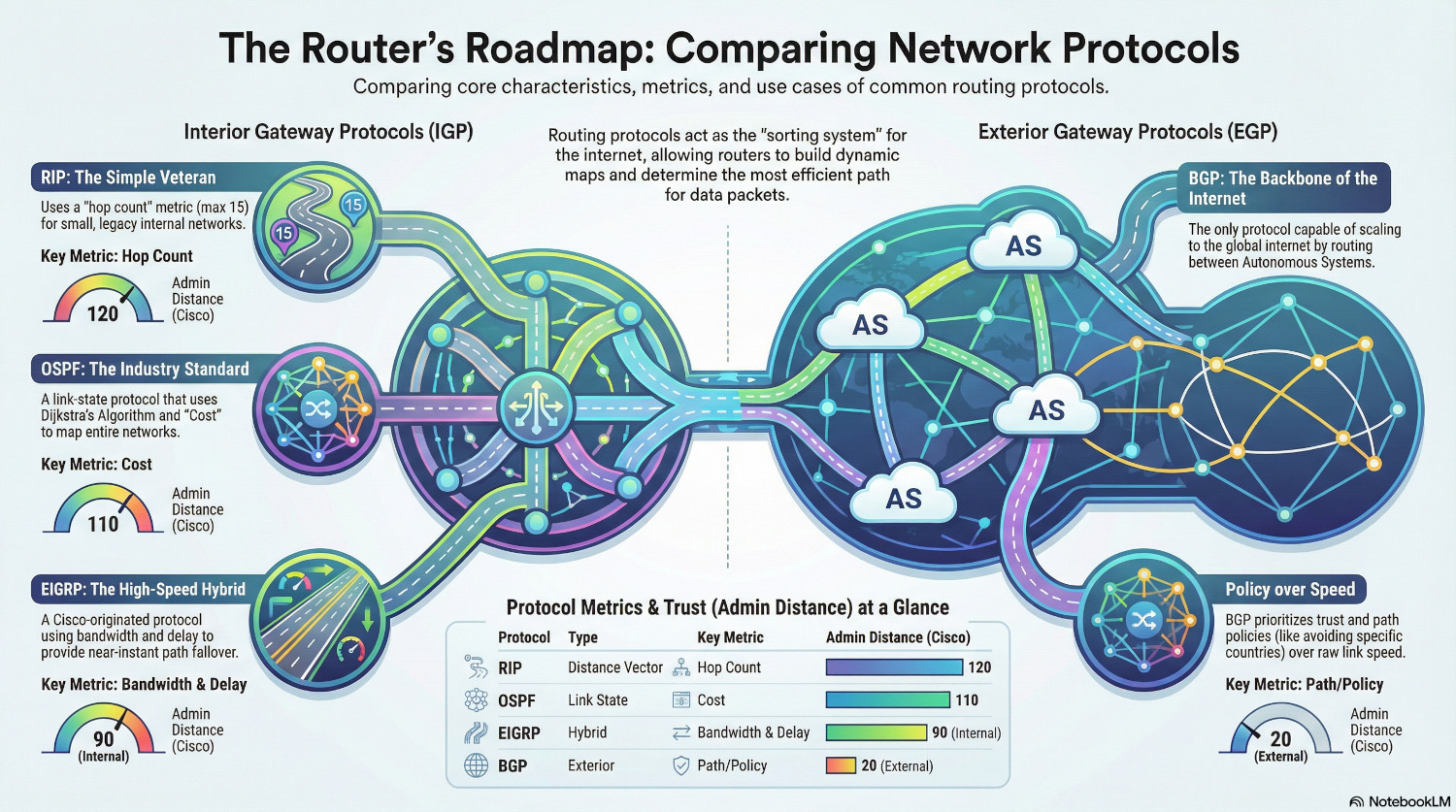
Routing Information Protocol (RIP)
RIP is once of the oldest distance vector protocols. It was designed for small, internal networks, but is no longer widely used.
RIP use a principle of ‘routing by rumour’. Basically, it routes packets based on what another router told it. Every 30 seconds, each router will send it’s entire routing table to it’s neighbours and updates it’s own according to what is received.
The only metric is cares about it hop count, if it has two routes to a destination the lower hop count will win regardless of the quality. Any route that exceeds 15 hops is considered dead and removed from the routing table.
Open Shortest Path First (OSPF)
OSPF has become the industry standard interior routing protocol. It is a link state protocol, which means every router holds a complete map of the network.
Each router sends Link State Advertisements (LSAs) to their neighbours in a defined network area, which contain details of their own links and the statuses of those links. The receiving routers use those LSAs to build a Link State Database (LSDB). The LSDB is the map, not the routing table!
The router then uses an algorithm called Dijkstra’s SPF Algorithm to find the best paths to put in the routing table. This algorithm uses Cost as the metric to decide the best path.
$Cost = Reference Bandwidth/Interface Bandwidth$
The reference bandwidth is the standard speed for the network. By default, it is 100Mbps, and as OSPF rounds costs up to the nearest whole number, it leaves it unable to distinguish between a 100Mbps link and a 1,000Mbps link.
Once the router has calculated the cost of each route, it will populate the routing table with the lowest cost route.
Enhanced Interior Gateway Routing Protocol (EIGRP)
EIGRP is a Cisco proprietry protocol (although it is now an open standard), that combines link state and distance vector methodologies, making it a hybrid protocol. It was designed to be faster than RIP and OSPF.
Instead of building a map of the network, EIGRP uses the Diffusing Update Algorithm (DUAL). Routers keep a list of Feasible Successor paths ready to go and can switch almost instantly if a Successor (primary) path fails.
While RIP uses Hops and OSPF using Cost, EIGRP uses a formula based on Bandwidth and Delay to find the biggest and shortest path to a destination.
Border Gateway Protocol (BGP)
BGP is the backbone of the internet. When it goes wrong, the internet goes down. It is the only routing protocol able to scale to meet the challenge.
It does this by not caring about individual links, instead treating Autonomous Systems as single hops.
Because traffic is now external, speed is no longer the only factor. By default, no-one trusts anyone else, and BGP needs to be able to handle that accordingly. Instead of just picking the fastest route, BGP might need to pick a route that avoids routers owned by a particular company, or routes that pass through a particular country.
Conclusions
Routing protocols allow us to communicate with the other side of the world. Without routing, we’d only be able to talk to devices on the same subnet as us.
Using complex rules and metrics, routers are able to determine the best route for our traffic to take before we even send it. Optimising configuration is important to ensure that paths are correct and traffic is routed efficiently.
For internal routing, OSPF has become the standard. For external, BGP is the only game in town.