
Public Key Infrastructure (PKI) Fundamentals

Public Key Infrastructure can be daunting for many administrators - knowing how to issue certificates is one thing but understanding what they actually contain is another thing entirely.
Previously, data was encrypted with a key and to decrypt it, the same key was used again, in a process called symmetric encryption. This caused an issue - how did the key get shared securely with the recipient?
To solve this, asymmetric encryption was created, which uses two keys instead of one.
Every time you browse to a website and see a padlock in the address bar, PKI is responsible.
PKI is the framework around digital certificates, and dictates how they are trusted and managed. Crucially, it provides confidentiality and integrity - it proves who someone is and that what they sent hasn’t been tampered with in transit.
Table of Contents
Public and Private Keys
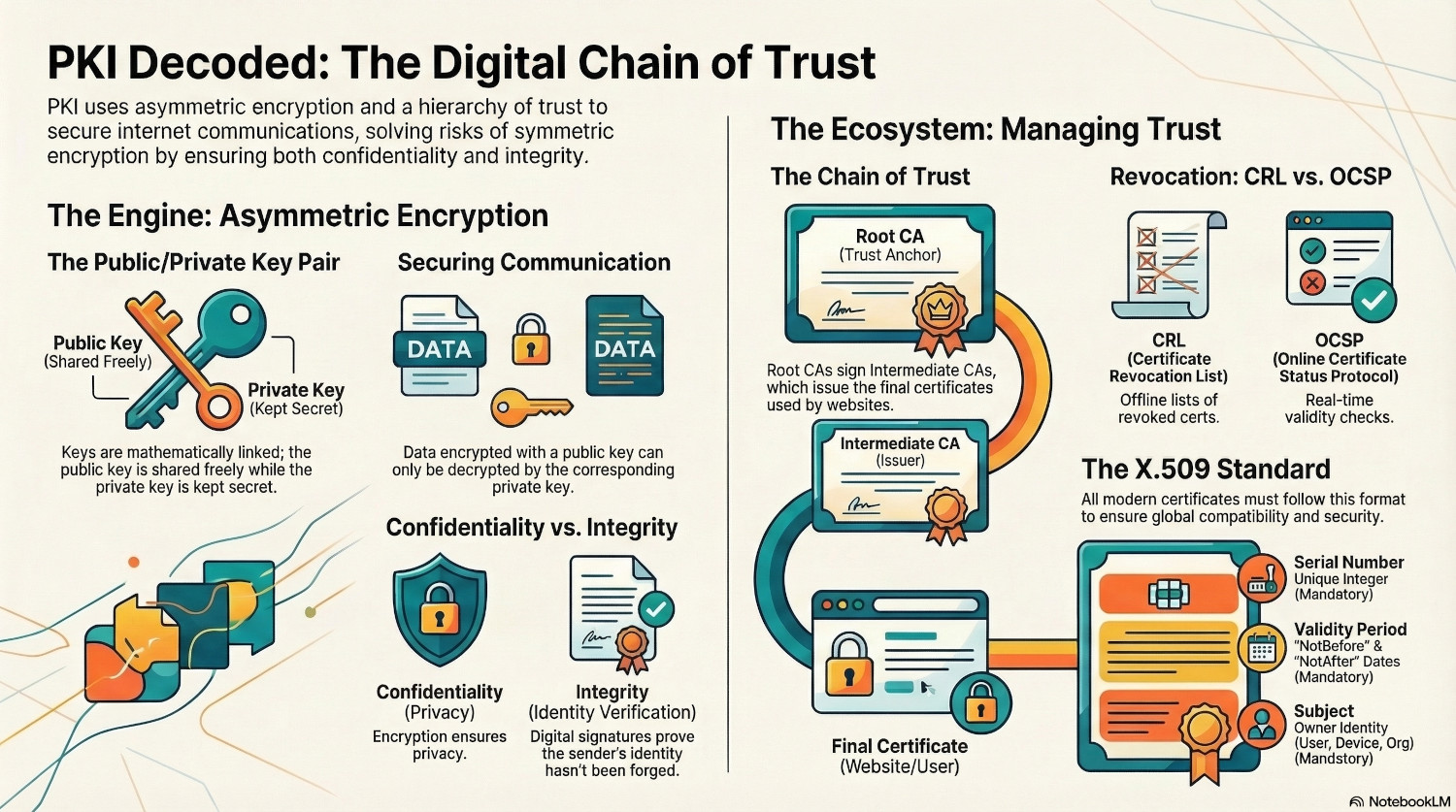
The underlying cryptography involved in PKI is the pairing of two keys, one public and one private. This is asymmetric encryption. The public key is mathematically derived from the private key, bit it is impossible to reverse engineer the private key from the public key.
If something is encrypted using a private key, it can only be decrypted using the corresponding public key. If something is encrypted using a public key, it can only be decrypted using the corresponding private key.
- Batman wants to communicate securely with Robin.
- They each generate a public/private key pair and share their public keys with each other.
- Batman writes a message, and encrypts it using Robin’s public key. Only Robin’s private key will decrypt this message.
- Robin writes a reply, and encrypts with the Batman’s public key. Only Batman’s private key will decrypt the reply.
Using this theory, public keys can be given out freely, and used to secure communications. This guarantees confidentiality, as only the private key holder can decrypt the message, but to provide integrity, we need a digital certificate.
Digital Certificates
A digital certificate ties an identity with a public key, using a trusted authority. The certificate contains the public key, and a digital signature from the authority. The signature is the hash of the certificate encrypted with the authorities private key. Only the authority has this private key, so it cannot be forged.
To verify the signature, the receiver can decrypt the signature using the authority public key, and compare that to their own hash of the certificate. If the two match, the certificate is genuine, providing integrity by proving the sender is who they say they are.
Certificate Authorities
The Certificate Authority (CA) is responsible for issuing, recording and revoking certificates. The client sends a Certificate Signing Request (CSR), the CA adds it's signature, send the certificate back and records it in database.
There are different types of certificate authority: Root CA and Intermediate CA, and these for the certificate’s Chain of Trust.
Root Certificate Authority
A Root CA is unique because it used a certificate it has signed itself, known as a self-signed certificate. This is the certificate that must be installed on all clients for them to trust certificates issued by this certificate authority, or it’s intermediates.
Intermediate Certificate Authority
Certificates are rarely issued directly by the Root Certificate Authority, as this would be a single point of failure. If the private key is compromised, every certificate would need to be revoked.
Instead, certificates are issued by Intermediate Certificate Authorities. These are digitally signed by the Root CA, so any client that trusts the Root CA automatically trusts the Intermediate CA, and therefore an certificates issued by it. This forms what is known as the Chain of Trust.
This allows the Root CA to be kept offline and only turned back on when a certificate issued directly from the root needs renewing, or a new Intermediate CA is required.
Certificate Revocation
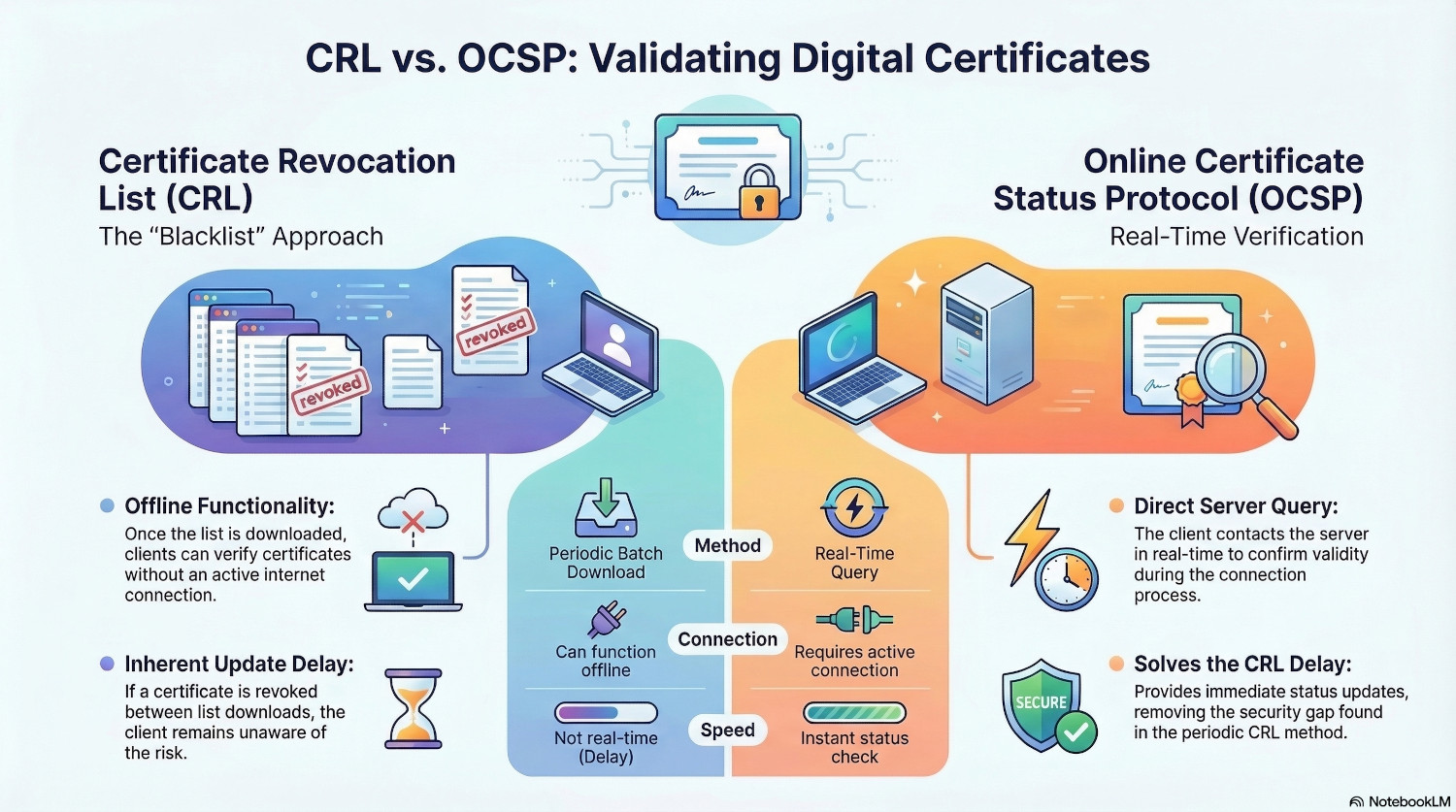
A certificate has a validity period, set by the CA, which defines the date after which the certificate will no longer be valid, but they can be revoked before that date. There are two mechanisms for checking certificate validity
Certificate Revocation List (CRL))
This is a list maintained by the CA of certificates it has revoked. Clients download the list periodically, and check any certificates against it to see if they have been revoked.
The benefit of this approach is that it can be performed offline, once the client has the list. However, it is not real time - if a certificate is revoked just after the client downloads the CRL, it won't know until it downloads it again.
Online Certificate Status Protocol (OCSP)
To solve the delay inherent in the CRL method, OCSP was introduced. This allows clients to contact the server in real-time to check if a certificate is valid.
X.509 Data Fields
A digital certificate must conform to the X.509 standard, which mandates certain data fields.
| Field | Description | Mandatory/Optional |
|---|---|---|
| Version | Usually v3 for modern certificates. | Mandatory |
| Serial Number | A unique positive integer assigned by the CA to track the cert. | Mandatory |
| Signature Algorithm | The mathematical algorithm used to sign the certificate. | Mandatory |
| Issuer | The identity (Distinguished Name) of the CA that signed it. | Mandatory |
| Validity Period | Contains the NotBefore and NotAfter date/time stamps. | Mandatory |
| Subject | The identity of the owner (User, Device, or Organization). | Mandatory |
| Subject Public Key Info | The actual public key and the algorithm it uses (RSA, ECC, etc.). | Mandatory |
| Common Name (CN) | The primary domain name. | Optional (Legacy; being replaced by SAN) |
| Subject Alternative Name (SAN) | List of all domains or IP addresses the cert is valid for. | Mandatory (For modern browsers) |
| Key Usage | Defines mathematical allowed actions (Digital Signature, Key Agreement). | Mandatory (In v3 certificates) |
| Extended Key Usage (EKU) | Defines the "job" or application (Server Auth, Code Signing). | Mandatory (For web/SSL) |
| Basic Constraints | Specifies if the certificate is allowed to act as a CA. | Mandatory |
| Subject Key Identifier (SKI) | A unique hash of the public key to help browsers find the right key. | Highly Recommended (Often required) |
Conclusion
PKI is the fundamental technology that secures the internet. For HTTPS to work, each website needs a certificate from a publicly trusted root authority, such as LetsEncrypt or Digicert.
The underlying assumption though is that private keys are kept private. If a private key leaks, the whole system falls apart, especially if it is the private key of a trusted root authority.
There have only been a couple of instances of a certificate authority being breached. In 2011, attackers gained access to the servers of DigiNota, a public certificate authority. While they didn’t catpure the private key, they did gain privileges to issue certificates for anything they liked. The Iranian government reportedly used fake certificates for Google to intercept Gmail traffic for over 300,000 users.
After the breach was discovered, the major browsers removed DigiNota from their trusted root authorities list, meaning any website with a certificate signed by DigiNota was no longer trusted. DigiNota went bankrupt within weeks.
For internal use, PKI can be used for 802.1x authentication, issuing certificates to devices that they can then use to authenticate to networks. For a long time Active Directory Certificate Services was the major internal PKI application, but Microsoft have now released a Cloud PKI.
PKI can be a scary topic for many people, but understanding how public and private keys are used to ensure confidentiality and integrity is crucial for securing communications.