
LLDP: Friend or Foe?

Even with the best will in the world, some contractors aren’t very good at labelling network ports.
This can be for a number of reasons, but the result is an exasperated admin or technician who just needs to know what port on the switch an outlet goes back to.
Fortunately, we have LLDP.
But, as always, it is a double edged sword. Convenience for the admin is a goldmine for the attacker. In this post, we’ll examine how LLDP works and how it is weaponised.
Table of Contents
What is LLDP?
LLDP stands for Link Layer Discovery Protocol, and it’s a vendor neutral, IEEE standardised protocol (IEEE 802.1AB). The purpose is to enable network devices to advertise their identity and various other details to their immediate neighbours.
It operates at layer 2 of the OSI model, the Data Link layer, and uses ethernet frames to communicate.
By starting a capture using Wireshark and the filter ‘lldp’ we can start to see it in action.

In a typical setup, a network device will send an LLDP advertisement every 30 seconds, which is exactly what we see here. Also note the destination: Nearest-Bridge.
This Nearest-Bridge is a specific layer 2 multicast address, that carries a specific rule:
A switch (bridge) must process this frame and NEVER forward it to another port.
LLDP is for neighbour discovery, not network discovery. If LLDP was transmitted to broadcast addresses, every port would receive LLDP frames for all network devices on the same VLAN. By using this address, LLDP ensures that frame stays local to the broadcasting device.
What is CDP?
CDP stands for Cisco Discovery Protocol, and was actually created before LLDP. They have the same overall function but CDP does things slightly differently. Most Cisco switches are capable of using LLDP.
LLDP Packet Inspection
Now let’s have a look at the actual data in the frame.
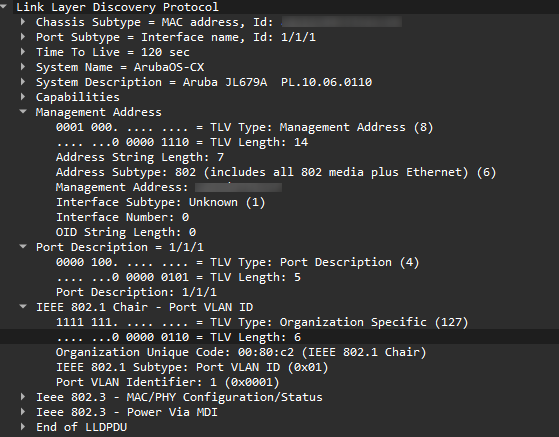
We can see the System Name (ArubaOS-CX), and the description (Aruba JL679A). We know the firmware version, and we can see the management address. There is also information about capabilities and the port description.
All-in-all, that's quite a lot of data the switch is giving away for free. I haven't sent a query, or even obtained an IP address. My laptop is completely passive, just listening to the frames coming down the wire.
Vulnerabilities
All of this information makes LLDP an extremely powerful reconnaissance tool. If an attacker can physically connect to a network, they can start to build a picture of what they are connected to, completely passively.
It can (and has) also been exploited in numerous ways (head over here for some excellent research). It details how an LLDP vulnerability can lead to complete system takeover by using buffer overflows to inject malicious code into memory.
Hardening LLDP
Hardening LLDP is difficult, mainly because it is an unauthenticated protocol. Any device can send an LLDP packet to it’s neighbour(s). The most effective mitigation is to disable it where it’s not needed, such as access ports for end user devices, but that will vary according to the environment.
It can be configured in receive only mode, meaning the switchport will receive LLDP packets from a connected device, but will not broadcast any of it’s own, preventing data leakage.
Quite a few of the vulnerabilities are because the vendors implemented outdated versions of the same open-source projects such as lldpd. Ensuring network vendors are using up-to-date third party applications is key part of supply chain security.
Overall, I think the best controls are the ones that should be in place anyway. Keep your network device firmware up to date, which hopefully patches previous vulnerabilities, and ensure the access to management addresses is tightly controlled, which reduces the usefulness of the data the attacker has gained.
Conclusion
LLDP is an indispensable tool in obtaining visibility over a network, but does raise questions about the amount of data it is leaking. Administrators should take a considered view over whether the benefits outweigh the cons on their network.
There are other methods of determining which switch port you are connected to, and lax labelling by a third party is not a good enough excuse to lower cyber security standards. In the hopefully unlikely event an attacker makes it onto your network, it’s a good idea to reduce the attack surface as much as possible, and at a minimum, LLDP should be disabled on end user access ports.