
Evaluating Multi Factor Authentication Methods
It's 2026, and identity is the new perimeter. The Crowdstrike Global Threat Report 2025 focuses heavily on the identity and key methods used to compromise accounts. Sure, attackers and bots are still hammering away at public IP addresses, looking for that RDP server you forgot was exposed. But as enterprise cyber defenses improve, attackers are increasingly turning to the weak link we can't get rid of.
The people.
NordPass have released their top password list for 2025. Here’s a flavour:
#1 - 12345
#2 - 123456
#3 - 12345678
#4 - 123456789
#5 - password
That’s enough of that. It doesn’t get much better. Humans are really, really bad at picking passwords. On a side note, I found it interesting that ‘skibidi’ appears at number 7. If you’re looking to crack passwords and your wordlists don’t include modern slang, you could be missing out!
But anyway, you really need to be using multi-factor authentication, for everything. Even if you have the best password in the world, if the service it’s used for is breached, it’s irrelevant. If you’ve never typed your email into HaveIBeenPwned I suggest you do so, and then sign up for alerts. If you haven’t been Pwned yet, it’s only a matter of time.
But, which MFA should you use? There are lots of choices, so let’s break them down.
Table of Contents
Legacy Methods
I’m not going to dwell too long here, as these are being phased out. Lots of companies don’t even offer them as options anymore (with the exception of email). If you (or your users) are still using these, get them moved to different methods.
Voice and SMS
These are done. Cooked. Apart from being impracticable and unreliable, they are also vulnerable. They’re vulnerable to phishing. SMS has no encryption. There are well-known flaws in the global telecoms network. Attackers can get your number swapped to a new SIM card, so they receive your authentication codes. Stop using them, now.
Slightly better, but not great. If your email address is compromised, the attacker can also log in to anything you use it for. They can stay hidden using specially crafted inbox rules and reset passwords, and MFA, for any services you’re registered to with that address.
Modern Methods
As older methods fall by the wayside, new methods are introduced. These methods are better, but not without their weaknesses.
Push Notifications
Push notifications are seen as easy for the user. They get an app on their phone, it asks them if they are trying to sign in. If they are, great, they hit approve. If not, they hit deny. Simple.
Except, what if they're not paying attention? What if they get so many notifications they simply stop reading them, and just hit anything to make it go away? I've dealt with a breach where the user was at an airport, waiting to get on a plane, and they hit approve. Later I asked them why, and they didn't know. They just did it. Like muscle memory.
As we said earlier, users are the weakest link in any security method.
Time-based One Time Pass-codes
These have become pretty standard now. You open your authenticator app, and you get the code that regenerates every 30 seconds, and you type it in and away you go.
This works using hashing with a shared secret. When you register the MFA, a secret key is generated. The service provider and the authenticator app both store it. The codes you see are generated by hashing the result of a calculation involving the key and the current time, and then truncating the result. Both ends do this separately.
When you enter the key you were shown on your phone, it’s compared with the key the identity provider generated. If they match, you’re in!
This is good because there’s no transmission of anything after the initial setup. The one-time-code are generated completely offline, so there's nothing to intercept.
It is however, vulnerable to phishing methods, such as a fake phone call from your IT Department, or bank. All they need to say is the following to an unsuspecting user:
“We just need to verify your account, would you please read us the code in your app.”
Oops.
Number Matching
Number matching is where the website shows you a number, and you have to enter it into the app, or select the right number from a few options. This one nearly made it into phish-resistant, but it’s not quite. There is still a number to give an attacker if they are convincing enough, or if the fake website is good enough.
It does however, mitigate the alert fatigue risk with notification based MFA. The user can only approve the request by entering the number on the screen, so they can't inadvertantly approve a login. It can be phished by a well crafted fake page, or possibly over the phone, but overall this is a strong method.
Phish Resistant MFA
Phishing Resistant is the holy grail, since it means even if a user wants to give their code to a hacker, the technology won't let them, because there is nothing to give. It takes the user out of the equation.
Hardware Keys (FIDO2)
Now we're into the gold standard of MFA methods. If you work in the defence industry, you'll almost certainly be familiar with this.
These work based on PKI - Public Key Infrastructure. When the key is registered to the identity provider, it generates a private key and a public key. The provider gets the public key. The private key is stored on the hardware, and never leaves. The domain name is stored alongside it.
When the users tries to authenticate, the website sends a chunk of random data, challenging the hardware key to encrypt it. The key first checks that it came from the exact domain it has stored, asks the user to confirm their presence (newer devices require biometrics), then encrypts the challenge with it’s private key.
Finally, the identity provider decrypts the challenge with the public key and checks for a match.
This is literally impossible to phish. There is nothing a user can give the attacker. The challenge can only be encrypted by that specific hardware token, for that specific domain.
Passkeys
These work in a very similar way to hardware keys, but the private key is stored either on a dedicated security chip (TPM) in the end-users device, or in a cloud password manager. It is still impossible to phish and it still mitigates fake domains. Software keys require biometric authentication as well (although often with device PIN fallback), so it has to be the user who unlocks it.
Conclusion
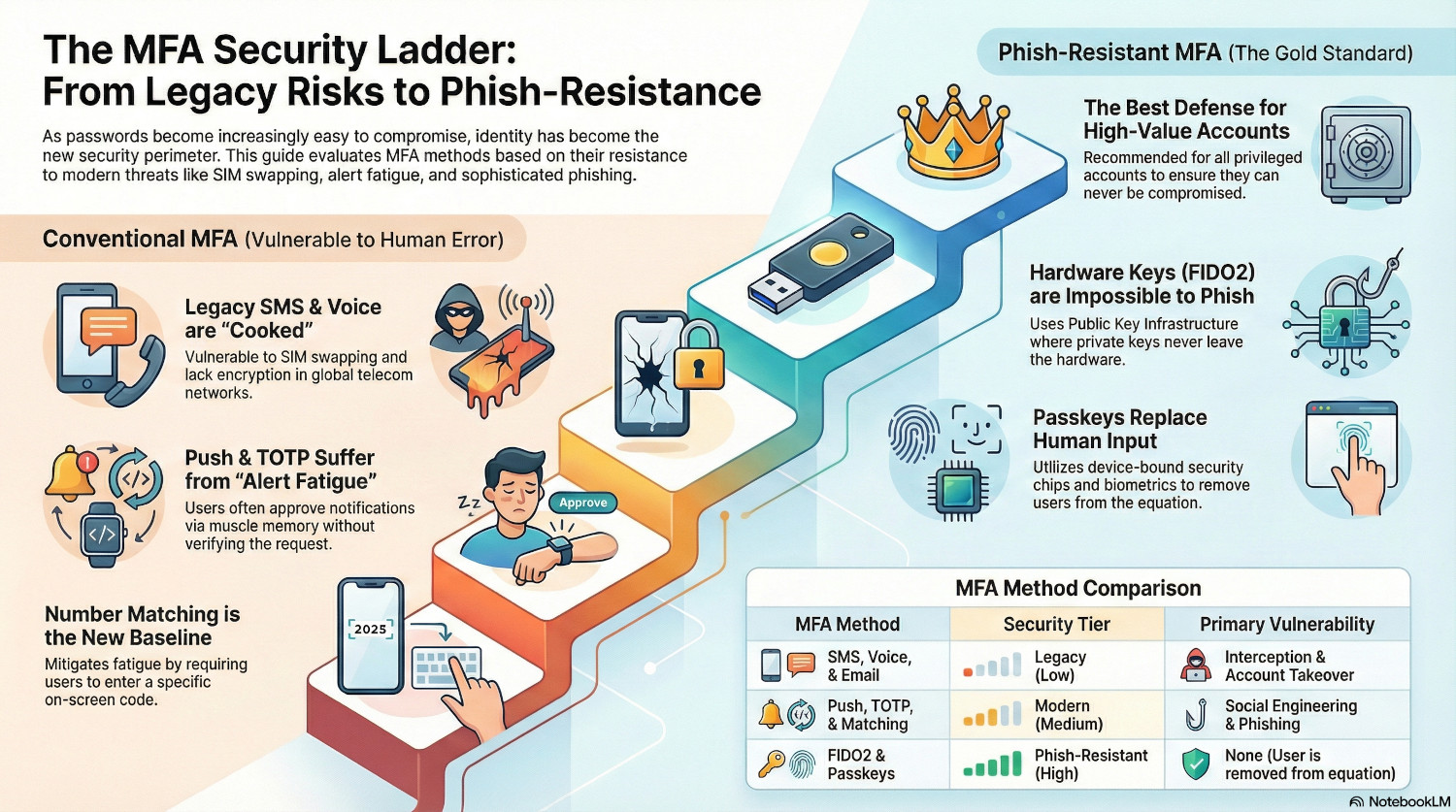
We’ve moved past the point where any MFA is good MFA. Any MFA is better than no MFA, but we need to be aware of where the vulnerabilities are. Legacy methods are easily compromised or phished. Methods that rely on the user doing things perfectly are no longer acceptable. Really, this just leaves number matching, and passkeys.
Number matching should be the absolute baseline for standard users in an organisation. Users with privileged accounts and high value users should be using passkeys.
Or get everyone using passkeys. Because that way, no-one can be compromised, ever.
Right?
Well, no.
Want to see how attackers are completely bypassing MFA by stealing session cookies?